





























Business Checks: Features, Security, and How to Choose the Right Format
Whether you're issuing payments, managing payroll, or maintaining records, choosing the right check stock can help protect your business from fraud while ensuring compatibility with your accounting systems.

Compatible with Accounting Softwares
Modern business checks are designed to integrate seamlessly with widely used accounting platforms, making printing fast and efficient. BankSupplies checks are compatible with:
• QuickBooks
• Peachtree
• Microsoft Money
• MYOB
Available Check Layouts and Formats
Choosing the correct check layout depends on your workflow and software requirements. BankSupplies offers multiple positioning options:
• Top Check with Signature Line
• Top Check with Lines
• Middle Check with Signature Lines
Each format is designed to align properly with different software configurations and printer settings, ensuring accurate printing every time.
Understanding Check Styles: Voucher vs. Manual Checks
In addition to layout, it’s important to understand the difference between voucher-style checks and manual cash disbursement checks, as well as the meaning behind style names like Marble Sky, Linen, or Parchment.
Voucher-Style Checks (Printable)
Voucher checks are designed for use with accounting software and standard office printers. These checks:
• Print on 8.5" x 11" sheets
• Include a check plus one or more voucher stubs
• Are ideal for batch payments and automated recordkeeping
Common voucher styles include:
• Marble Sky Voucher
• Linen Voucher
• Stone Voucher
These options differ primarily in their background patterns and color themes, not in functionality.
Manual Cash Disbursement Checks (Handwritten)
Manual checks are intended for situations where checks are written by hand rather than printed. These are commonly used for:
• Teller transactions
• On-the-spot payments
• Low-volume or backup payment processes
Examples include:
• Parchment Manual Cash Disbursement
• Marble Sky Manual Cash Disbursement
• Tranquility Manual Cash Disbursement
• Bordeaux Manual Cash Disbursement
Business Checks Product Reference
This table outlines available business check formats to help you quickly identify the right option for your operation. You can see all of our available products in the Checks & Cash Disbursement category.
| Item Name | BSI SKU | Best Use | Software Compatible |
|---|---|---|---|
| Linen Voucher Style Checks-Basic | 206-30000 | High-volume printing, payroll, AP | Yes (Quickbooks, etc.) |
| Marble Sky Manual Cash Disbursement Check | 206-50004 | On-the-spot payments, teller use | No |
| Marble Sky Manual Cash Disbursement Check 2-Part | 206-30000 | Recordkeeping and handwritten tracking | No |
Built-In Security Features to Protect Your Business
Security is a critical factor when selecting business checks. High-quality check stock includes multiple features designed to prevent fraud, duplication, and tampering.
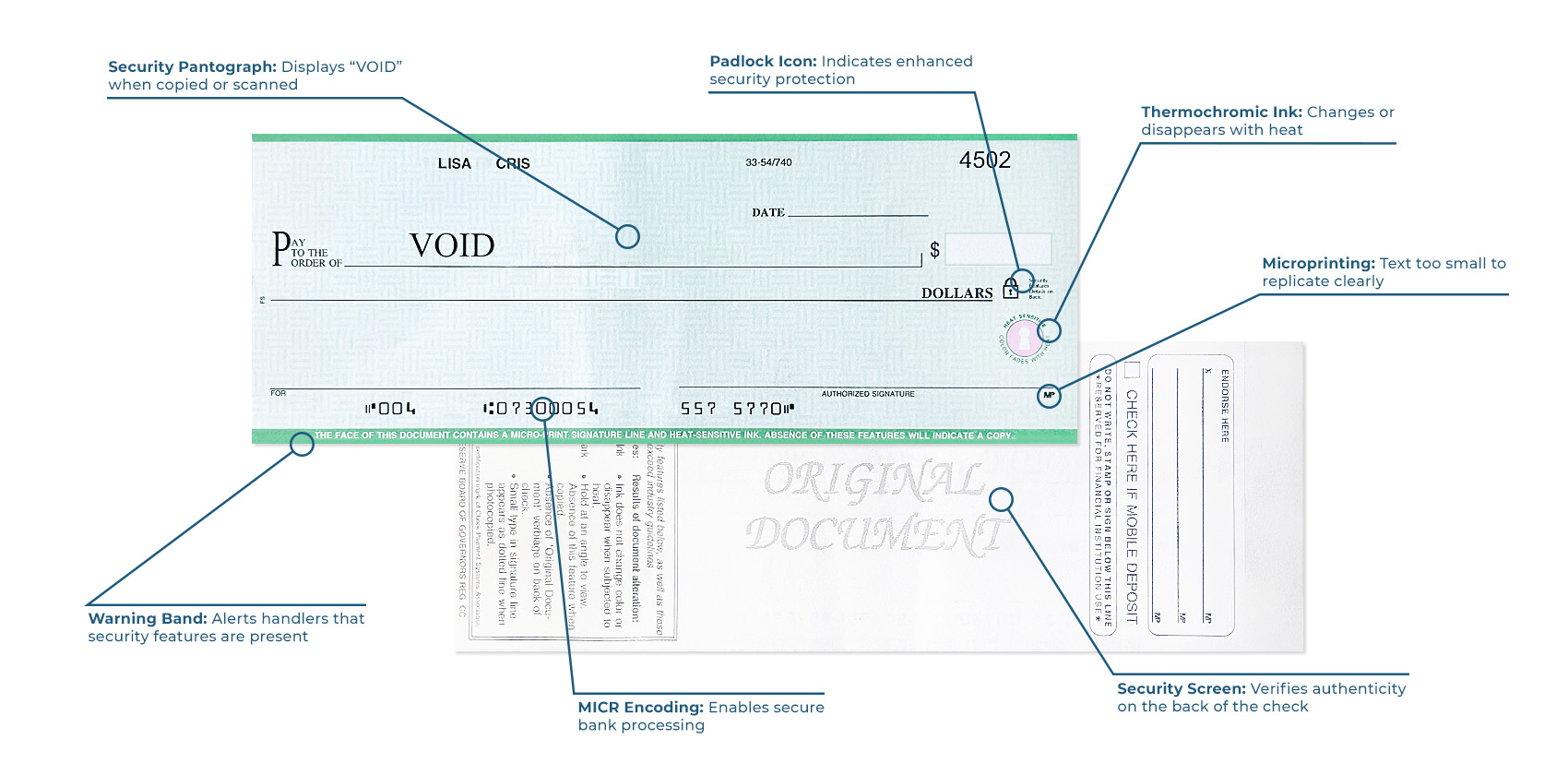
Common security features include:
• Warning Band – Alerts handlers that security features are present
• Security Pantograph – Displays “VOID” when copied or scanned
• Microprinting – Text too small to replicate clearly
• Padlock Icon – Indicates enhanced security protection
• Security Screen – Verifies authenticity on the back of the check
• Thermochromic Ink – Changes or disappears with heat
• MICR Encoding – Enables secure bank processing
These layered protections help safeguard your financial transactions and reduce the risk of check fraud. The infographic below outlines common security features
How to Choose the Right Business Check
When selecting business checks, consider the following factors:
• Software compatibility – Ensure alignment with your accounting system
• Check type – Choose between printable voucher checks or manual checks
• Layout position – Match your printer and software setup
• Security level – Select features based on your risk level
• Volume needs – High-volume businesses benefit from printable checks
• Customization – Add logos and branding for a professional appearance
Final Thoughts
The right business checks do more than facilitate payments. They support efficiency, organization, and security across your entire operation.
By understanding the differences between check types, layouts, and security features, you can choose a solution that fits your workflow while protecting your business from costly errors and fraud.
Related Articles
Explore more resources from the BankSupplies Resource Center.

Can Your Currency Counter Detect Fake Money?
Learn about the counterfeit detection features in modern currency counters and how they safeguard your business.
Read Article
Does a Cheaper Currency Counter Mean Lower Quality?
Understanding price vs. performance in currency counters.
Read Article
Banks and Credit Unions Supplies List
Comprehensive catalog of essential supplies and equipment for banking operations.
View PDF